

Analyze in the browser
The left drawer of an opened spatial dataset lists the analyses. Each one runs in your browser, on the data in view, and nothing is sent anywhere to compute it. What it makes is kept with the data: in the unsaved changes until you save a version, then in the version.
The analyses
- Label cells: draw around cells (lasso, circle, ellipse, square or rectangle) and name them, into a new column or one you have.
- Find clusters: Leiden clustering the way scanpy does it by default. Counts are normalized and log-transformed, the most variable genes go into a PCA, and Leiden works on the cells' nearest-neighbor graph. Resolution is yours to set. The report shows each cluster's size and where it is, and how much of the variation the PCA's components hold.
- Compare groups: a Wilcoxon test of every gene between two groups. A group can be a category of any column or the cells you selected on the tissue. The report shows the volcano beside maps of where the two groups are, and each side's strongest genes.
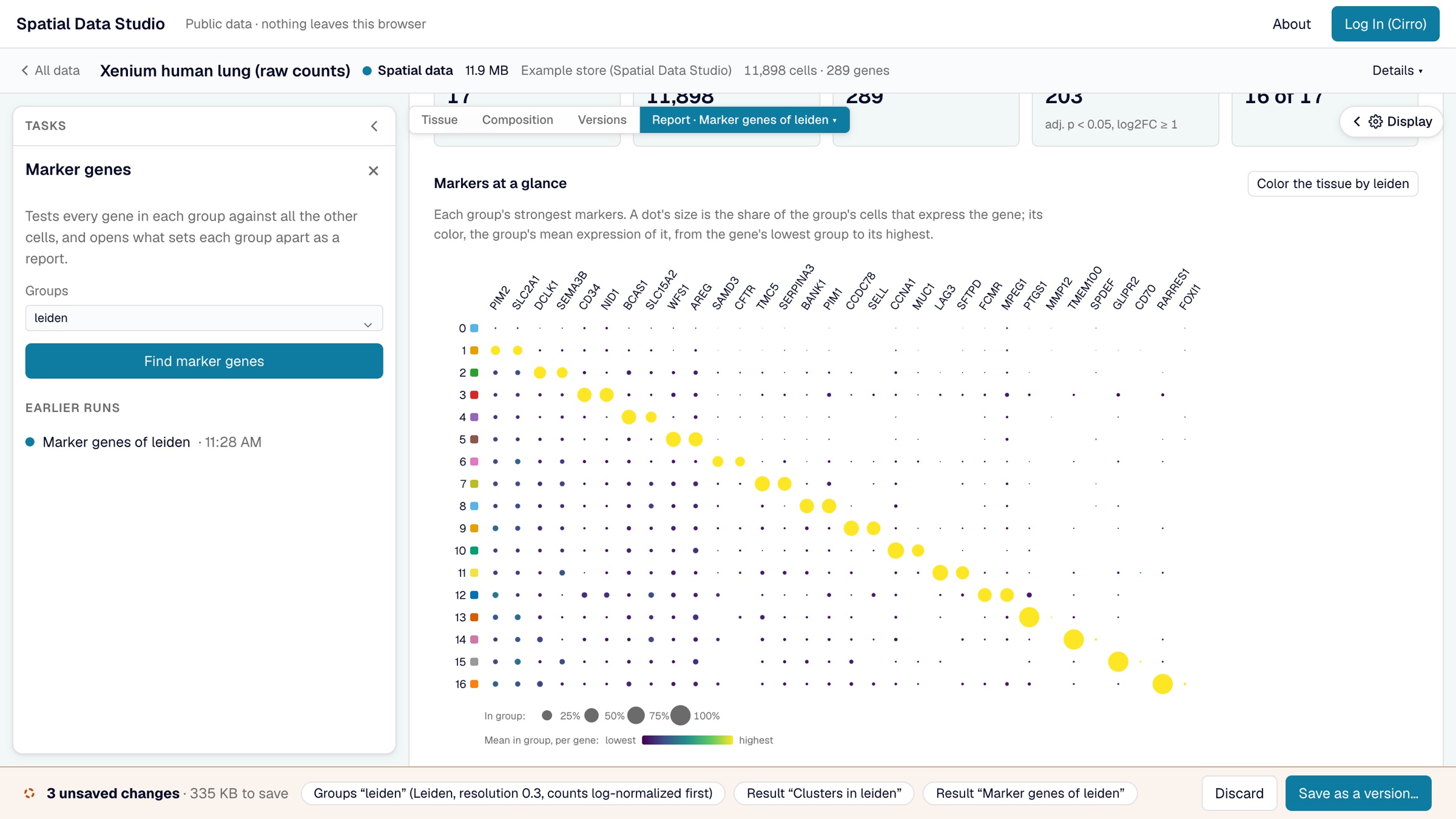
- Marker genes: each group of a column against all the others. The report shows every group's strongest markers in one dot plot, then a card per group: its size, where its cells are, and what marks it.
- Spatially variable genes: Moran's I of every gene over each cell's six nearest neighbors on the tissue. The report maps the strongest genes, and sorts the strongest 60 into spatial patterns: genes whose maps look alike.
- Neighborhood enrichment: how often each pair of groups are neighbors, against shuffled labels. The report shows the heatmap, the pairs that sit together and apart most, and a card per group saying which groups it neighbors.
- Cellular niches: each cell's mix of groups among its nearest neighbors, clustered into niches and written as a new column. The report shows what each niche is made of and where it is.
The gene analyses need the store's expression matrix. Stores saved without one (like three of the four public sections) still offer labelling, neighborhoods, niches and figures, and the drawer names the analyses they can't run. Clustering is the slowest: seconds for tens of thousands of cells, about half a minute for 200,000.
Reports
Each analysis opens as a report across the view when it finishes. A report starts with what was run, on which column, with which settings and by whom; then the numbers that sum it up, its charts, and a card for each group, with the full table folded at the end. The Reports menu over the view and the task drawer list every report kept here, and Remove… takes one out. A report draws only on what was kept and on data the app never changes, so it reads the same whenever it is opened. Picking a gene in a report maps it on a thumbnail of the tissue, and from there on the tissue itself; a report's chart can be saved as a figure.
Score a gene set
Where a report shows genes that go together (a group's markers, the genes higher on one side of a comparison, a spatial pattern), Score turns its top 25, or as many as pass the cutoffs, into one value per cell, as scanpy's score_genes does: each cell's mean expression of the genes, less that of genes expressed at similar levels. The score is a new column, and the tissue is colored by it.
Keep a figure
Save as a figure, in the task drawer, keeps the tissue as it is shown, with its colors and framing, as a figure, or downloads it as SVG, PDF or a 300 dpi PNG of what is between the drawers, one column (89 mm), two columns (183 mm) or a 16:9 slide wide. Downloads are of the tissue, so open the Tissue view first. A long legend takes more columns before the page grows, and a page stops at 240 mm: groups that still don't fit are left out of the legend, and the task says how many. A color of more than 100 groups has no legend.
A kept figure is saved with the version, listed under the Figures tab and on the map's Figures stage, and opens framed as it was.
How the results compare with scanpy and squidpy
The methods follow scanpy and squidpy and are tested against them, so a result agrees with what Python gives on the same data, with these differences:
- The Wilcoxon test is always tie-corrected (scanpy's
tie_correct=True), which gives sparse genes somewhat smaller p-values than scanpy's default. - Cells with no group are left out of "the rest" when one group is compared with all the others; scanpy counts them in.
- Leiden partitions differ from scanpy's about as much as two scanpy runs with different seeds differ from each other; the number of clusters is much the same.
- The most variable genes are exactly the number asked for; scanpy also keeps genes tied at the cutoff. The PCA takes at most 5,000 of them.
- Permutation z-scores (neighborhood enrichment) and gene-set scores draw their random samples differently from numpy, so they differ from squidpy's and scanpy's by sampling noise.
When the browser isn't enough
The browser runs the analyses above. For any other squidpy or scanpy function, for a recipe of several steps, or for a section too big for your computer, open the dataset in an Analysis Workspace.